
ForeFlight’s Instructor Tools, found in the Logbook menu, let flight instructors save their certificate details and signature once, then issue and track student endorsements digitally, alongside a traditional paper logbook.
What’s included
- Digital Signature: save your instructor information and signature once and apply it to any endorsement.
- Endorsement Records: a list of every endorsement you’ve issued, with its status.
- Endorsement lookup: search for an endorsement type to fill in the standard title and wording automatically.
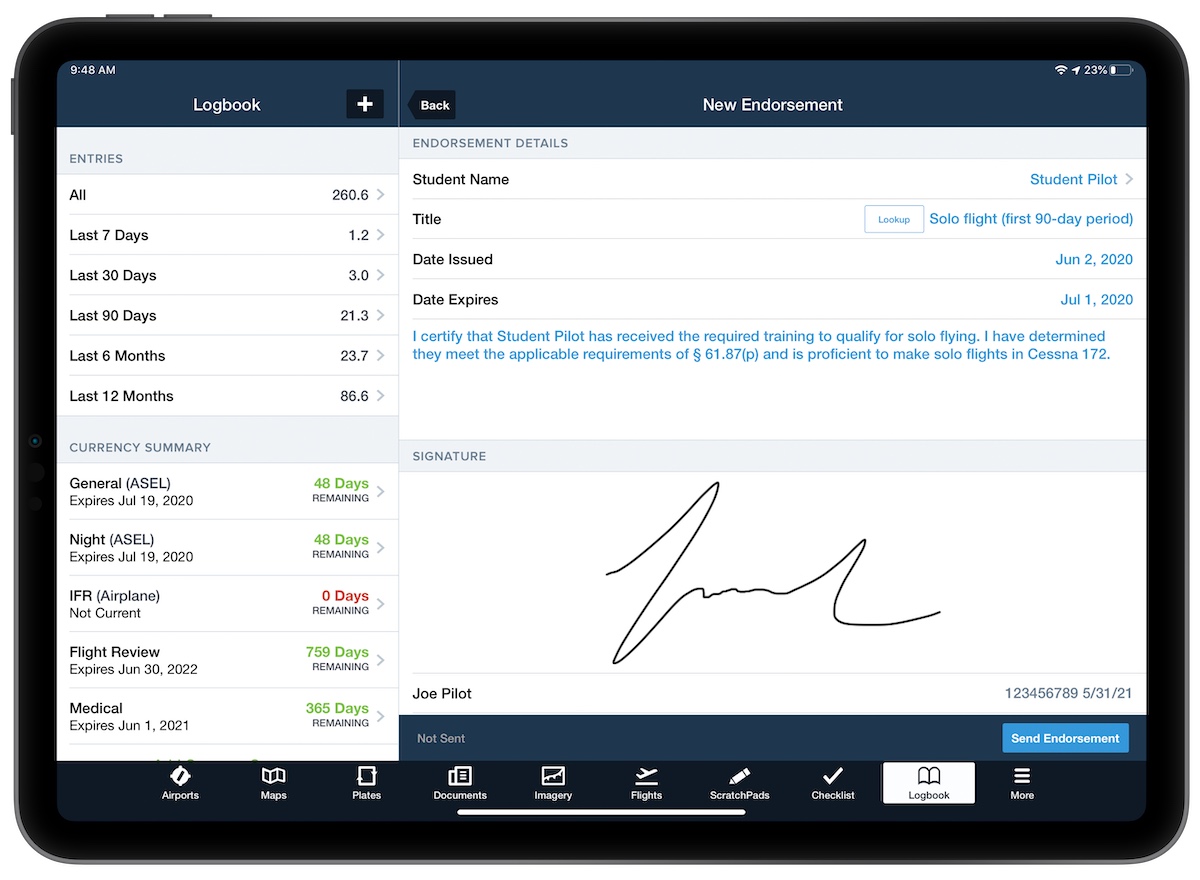
How a remote endorsement works
- The instructor opens Endorsement Records and taps +. Their saved signature is added automatically.
- They choose the student from their Logbook contacts and look up or enter the endorsement wording.
- They tap Send Endorsement.
- The student gets a notification and an email, and the endorsement appears under Drafts & Requests in their Logbook, ready to accept or decline.
- Pilots who don’t use ForeFlight receive the endorsement as a PDF by email.
How PAS uses it
At PAS Flight Training we use both physical and digital logbook endorsements, because we like to keep up with all the technologies accepted by the FAA. Ken signs your paper logbook with a printed endorsement, and he also uses ForeFlight Instructor Tools to sign flight review and recurrent training endorsements digitally.
After your training, the signed endorsement goes straight to your ForeFlight logbook. Accept it under Drafts & Requests and your records are up to date.
Source: ForeFlight – Logbook Instructor Tools
More stories Aviation News →